


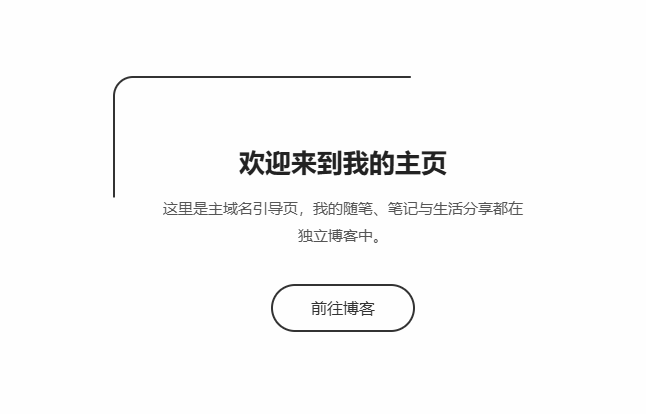
单站点引导页(主域名专用),简洁大方,核心指向 blog 二级域名,适配电脑 / 手机,带交互效果,直接部署即可。
部署 & 修改步骤
1.修改链接
将 https://blog.你的域名.com 替换成你真实的博客二级域名。
2.自定义文字
标题、介绍文案可按需修改;
底部小字也可以删除或改写。
3.部署
把文件命名为 index.html,上传到主域名网站根目录,访问主域名就会展示此页面。
纯白底 + 线条动效(极简科技风)
特点:干净白底,线条环绕动画、文字渐入,低调炫酷,风格百搭。
<!DOCTYPE html>
<html lang="zh-CN">
<head>
    <meta charset="UTF-8">
    <meta name="viewport" content="width=device-width, initial-scale=1.0">
    <title>欢迎来访</title>
    <style>
        * {
            margin: 0;
            padding: 0;
            box-sizing: border-box;
            font-family: system-ui, sans-serif;
        }

        body {
            min-height: 100vh;
            background: #fefefe;
            display: flex;
            justify-content: center;
            align-items: center;
            padding: 20px;
        }

        .box {
            position: relative;
            padding: 70px 50px;
            text-align: center;
            max-width: 460px;
            width: 100%;
        }

        /* 旋转线条边框动画 */
        .box::before {
            content: '';
            position: absolute;
            top: 0; left: 0; right: 0; bottom: 0;
            border: 2px solid #333;
            border-radius: 20px;
            animation: rotate 8s linear infinite;
        }

        @keyframes rotate {
            0% { clip-path: inset(0 0 98% 0); }
            25% { clip-path: inset(0 98% 0 0); }
            50% { clip-path: inset(98% 0 0 0); }
            75% { clip-path: inset(0 0 0 98%); }
            100% { clip-path: inset(0 0 98% 0); }
        }

        .title {
            font-size: 26px;
            color: #222;
            margin-bottom: 16px;
            opacity: 0;
            animation: fadeIn 1s ease forwards 0.2s;
        }

        .desc {
            font-size: 15px;
            color: #555;
            line-height: 1.8;
            margin-bottom: 35px;
            opacity: 0;
            animation: fadeIn 1s ease forwards 0.4s;
        }

        .btn {
            display: inline-block;
            padding: 12px 38px;
            border: 2px solid #333;
            color: #333;
            text-decoration: none;
            border-radius: 50px;
            transition: all 0.3s;
            opacity: 0;
            animation: fadeIn 1s ease forwards 0.6s;
        }

        .btn:hover {
            background: #333;
            color: #fff;
        }

        @keyframes fadeIn {
            to { opacity: 1; }
        }
    </style>
</head>
<body>
    <div class="box">
        <h1 class="title">欢迎来到我的主页</h1>
        <p class="desc">这里是主域名引导页,我的随笔、笔记与生活分享都在独立博客中。</p>
        <!-- 替换域名 -->
        <a href="https://blog.你的域名.com" class="btn" target="_blank">前往博客</a>
    </div>
</body>
</html>
使用说明
修改代码里 href 后的地址,换成你的 blog 二级域名;
把文件命名为 index.html 上传到主域名根目录即可部署;
极简线条动画,风格低调干净。
评论 (0)